How to Clean Corroded Car Battery Terminals
Disconnect the battery, brush the posts and cable ends until the metal shows, wash the tray and cables, then refit the clamps and protect the terminals with washers.

On this page
The crust on the battery posts is one common reason the car cranks slow on a cold morning: corrosion between the post and the clamp chokes the connection. How to clean corroded car battery terminals comes down to a short job in the garage: disconnect the battery, brush the posts and the cable ends until the metal shows, wash away the residue, then refit the clamps and protect the terminals to slow the crust from coming back. The brushes, cleaner and washers below cover the brushing, washing and protection parts of that job.
As an Amazon Associate I earn from qualifying purchases. GarageToolHQ earns a commission when you buy through links on our product pages, at no extra cost to you. Read our affiliate disclosure.
Below: how to disconnect safely, what to brush and wash, how to refit the clamps, and the gear that covers each step.

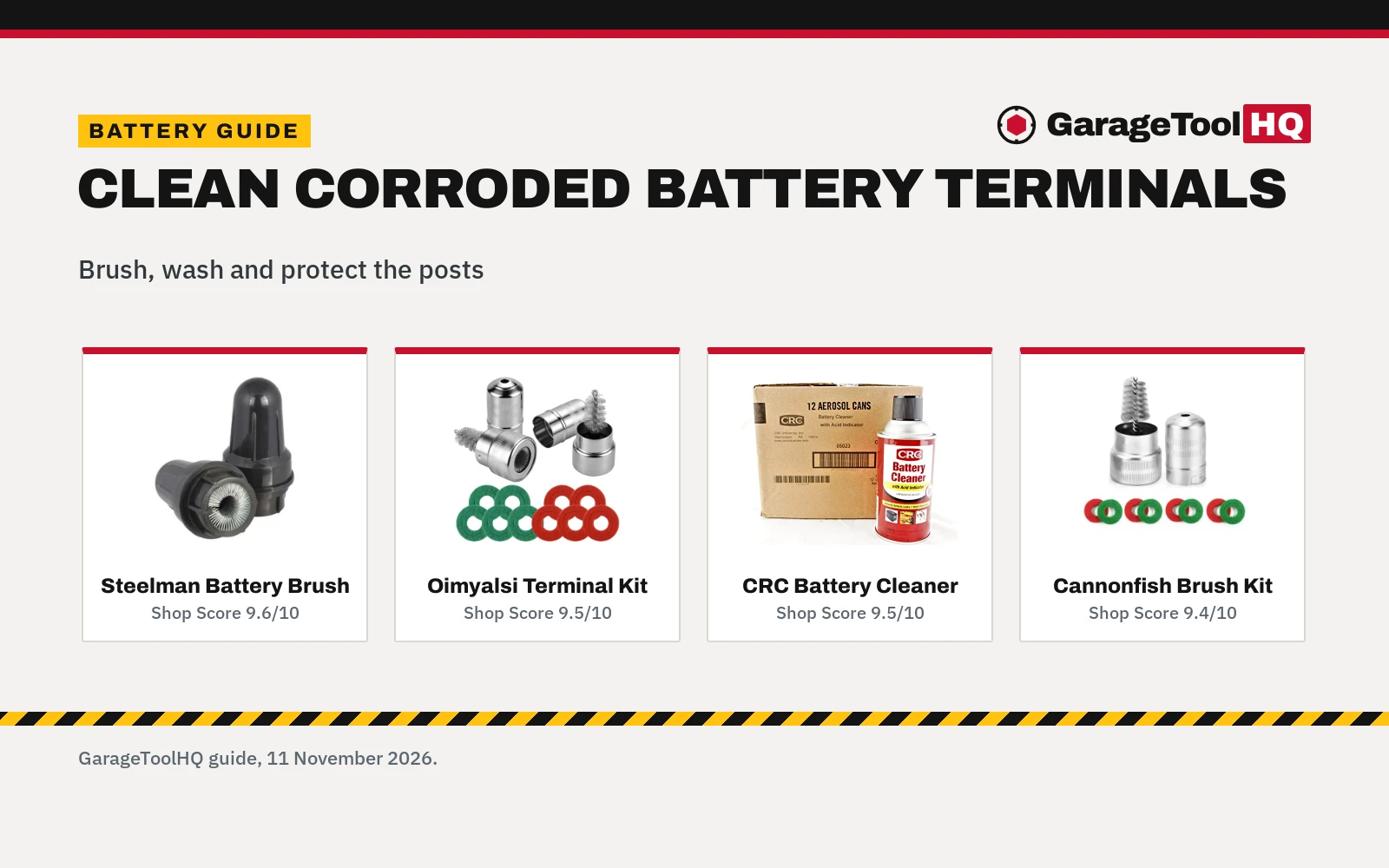
Steelman Battery Post Terminal Cleaner
A steel-bristle brush for top and side battery terminals, with a storage cover and an acid-resistant case, backed by a limited lifetime warranty.
Pros
- Steel bristles set tight in the wire spine for heavy-duty brushing
- Made for both top and side terminals
- Acid-resistant case resists battery acid and cleaning solvents
- Limited lifetime warranty stated on the listing
Cons
- No weight is stated on the listing
- A single brush with no washers included
- No cleaner included for the tray and cables
- The listing does not state cable-end cleaning

Battery Terminal Cleaner Tool Kit
A 2-pack of metal-case terminal brushes with 10 anti-corrosion fiber washers, 5 red and 5 green, for 6V and 12V top-post and side-post batteries.
Pros
- 2 brushes and 10 washers in one kit for full terminal care
- Washers fit top-post and side-post batteries, 6V and 12V
- Red washers for positive and green for negative, per the listing
- Inner ring removes to fit larger terminals, per the listing
Cons
- Only a 30 day warranty is stated
- No cleaner is included for the tray and cables
- The listing does not state how long the washers last
- One size only, at 2.95 x 2.95 x 1.57 in

CRC 05023-12PK Battery Cleaner
A case of 12 cans of 11 oz battery cleaner that removes corrosion, neutralizes acid and flags leaks with an acid indicator.
Pros
- Removes corrosion and neutralizes acid, per the listing
- Acid indicator flags leaks
- Suits terminals, posts, trays and cables
- 12 cans in the case for repeated cleaning
Cons
- No warranty term is stated on the listing
- No brush is included, so posts need a separate brush
- No weight or dimensions are stated
- No washers included for protection after cleaning

Battery Brush Cable Cleaner with 8Pcs Protector
A battery brush with a spiral head for posts and cable ends, plus color-coded fiber washers for top-post and side-post terminals.
Pros
- Spiral brush cleans posts and cable ends
- Works with top-post and side-post terminals
- Color-coded washers help prevent future corrosion, per the listing
- Easy-grip handle for hard-to-reach terminals, per the listing
Cons
- Title says 8 washers while the bullets say 4 washers
- No weight or dimensions are stated
- Warranty is listed as '1' with no unit, so no term is stated
- No cleaner is included for the tray
How to clean corroded car battery: disconnect first
Start with the engine off and the keys out of the ignition. Loosen the clamp on the negative cable first and move it aside so it cannot touch the post, then loosen the positive clamp the same way. Wear eye protection and gloves, and keep wrenches and other metal tools from touching both posts at once.
Brush the posts and the cable ends
Work the brush over each post and inside each clamp until the metal shows bright and clean, then brush the cable ends the same way. The spiral brush on the Cannonfish kit cleans inside the cable ends, and the Steelman brush covers top and side terminals. Shake the loose corrosion out of the tray and off the battery top before you wash anything.
| Step | Do this | Watch for |
|---|---|---|
| Disconnect | Negative cable off first, then positive | A clamp that can swing back onto the post |
| Brush | Brush posts, clamps and cable ends | Corrosion left inside the clamp |
| Wash | Spray cleaner on posts, tray and cables | Residue left in the tray |
| Refit and protect | Refit clamps snug, add washers | A loose clamp or a missing washer |
Wash, neutralize and dry
Apply the battery cleaner over the posts, the tray and the cable ends and let it work, then wipe the residue away. The CRC cleaner neutralizes acid and carries an acid indicator that flags leaks, so it suits the tray and the cables as well as the posts. Dry the terminals before you refit the clamps.
Refit and protect the terminals
Slide the clamps back onto the posts and tighten them until they sit snug and cannot twist by hand. Slip a fiber washer over each post before the clamp goes on: red for the positive post and green for the negative post, per the Oimyalsi listing. The listing also suggests a thick layer of insulating grease on the terminals and contacts after cleaning, to slow corrosion and keep moisture out. Our terminal protector vs dielectric grease guide compares the two ways to coat the posts.
The gear: brushes, cleaner and washers
The brushing, washing and protection steps each have a tool below, so the four listings cover those parts of the job.
Lead-acid batteries can release hydrogen while charging, so charge in a ventilated space away from sparks and flames, connect positive first and negative last, set the charger to the battery type (flooded, AGM, gel, lithium), and wear eye protection. Read our Safety Disclaimer.
FAQ: garage tools
Do I disconnect the battery before cleaning the terminals?
Yes. Loosen the negative cable first and move it aside, then the positive cable, so no tool can bridge the posts while you brush. Refit the positive cable first and the negative cable last.
What cleans battery corrosion off the posts?
A wire brush made for battery posts, worked over each post and inside each clamp until the metal shows, plus a battery cleaner for the tray and the cable ends. The brushes and the CRC cleaner in the gear section cover both parts of the job.
Can one brush clean top-post and side-post terminals?
Yes, if the listing states both. The Steelman, Oimyalsi and Cannonfish listings all state top and side terminal use, so one brush covers either post style.
How do I keep the terminals from corroding again?
Fit a fiber washer on each post when you refit the clamps, red for positive and green for negative, and coat the terminals and contacts with insulating grease after cleaning, as the Oimyalsi listing suggests. The CRC cleaner also neutralizes acid on the tray and cables.
What if the corrosion is on the cables, not the posts?
Brush the cable ends with the spiral brush and wash them with battery cleaner: the Cannonfish listing states its brush cleans cable ends, and the CRC listing states its cleaner suits cables as well as terminals, posts and trays.
Related: battery charger maintainer picks, terminal protector vs dielectric grease and our diagnostics and electrical hub.