Elm327 vs Obd2 Scanner: Which One Should You Buy?
Elm327 vs obd2 scanner explained: what an ELM327 adapter is, how it differs from a standalone scanner, and four adapter examples with their stated specs.

On this page
Top picks at a glance
As an Amazon Associate we earn from qualifying purchases.
- 1
 OHP FORScan ELM327 OBD2 to USB Diagnostic Scan Tool for Ford9.7/10View on Amazon
 - 2
 XTOOL IP500 for BMW OBD2 Scanner9.8/10View on Amazon
 - 3
 ELM327 OBDII Car Auto Diagnostic Scanner9.3/10View on Amazon
 - 4
 Obd2 Bluetooth ELM327 v1.4 Scanner with PIC18F25K80 OriginalView on Amazon
 - 5
 Veepeak Mini Bluetooth OBD2 Scanner Code Reader for AndroidView on Amazon
 - 6
 OBDLink MX+ OBD2 Bluetooth Scanner for iPhoneView on Amazon
 - 7
 OBD2 Scanner & WiFi Car Code ReaderView on Amazon
 - 8
 NEXAS NexLINK Bluetooth OBD2 Scanner with Live Data for AllView on Amazon
 - 9
 Launch Creader 3001 OBD2 ScannerView on Amazon
Elm327 vs obd2 scanner: which one should you buy? An ELM327 adapter is a cheap Bluetooth or USB dongle that talks to your car’s OBD2 port and hands the data to a phone app like Torque. A full OBD2 scanner is a standalone device with its own screen and deeper functions. Pick an ELM327 adapter if you want cheap code reading and clearing on a phone; pick a full scanner if you want to work without a phone and go beyond basic codes.
More options to compare
 Obd2 Bluetooth ELM327 v1.4 Scanner with PIC18F25K80 OriginalCheck price on Amazon
 Veepeak Mini Bluetooth OBD2 Scanner Code Reader for AndroidCheck price on Amazon
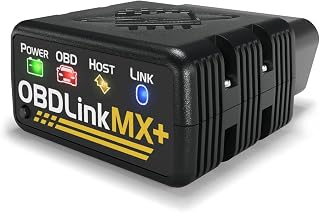 OBDLink MX+ OBD2 Bluetooth Scanner for iPhoneCheck price on Amazon
 OBD2 Scanner & WiFi Car Code ReaderCheck price on Amazon
 NEXAS NexLINK Bluetooth OBD2 Scanner with Live Data for AllCheck price on Amazon
 Launch Creader 3001 OBD2 ScannerCheck price on Amazon
GarageToolHQ earns a commission when you buy through links on our product pages, at no extra cost to you. Read our affiliate disclosure.
Below: what an ELM327 adapter actually is, how it differs from a standalone scanner, the four ELM327 adapters covered in this guide, and what to check on any adapter listing before you buy.
Elm327 vs obd2 scanner: the difference
ELM327 is the interface chip inside the small adapters in this guide. It plugs into the OBD2 port under the steering wheel, pairs with a phone over Bluetooth or connects over USB, and an app does the talking. The KVAEY and Dickno listings pair with the Torque app over Bluetooth with PIN 1234; the OBDResource listing connects over USB and works with Elmconfig, FoCCCus and Scanmaster on Windows. The adapter itself has no screen, so your phone is the display.
A full OBD2 scanner is the opposite shape: a handheld unit with its own screen, buttons and software, no phone required. The listings here do not include a standalone scanner, so the scanner side is covered by buying advice: a standalone unit suits a garage where the phone is not wanted, or where the job needs functions beyond reading and clearing codes. If you only need to read and clear engine codes and watch live data, an ELM327 adapter with a free app is the cheap route in.
The ELM327 examples we reviewed
All four listings in this guide are ELM327 adapters, so they show the adapter side of the question: USB versus Bluetooth, phone apps, and what each one claims to do.
OBDResource ELM327 USB for Ford
This is the specialist of the set: an ELM327 USB adapter with MS-CAN and HS-CAN toggle switches, built for Ford, Lincoln, Mazda and Mercury vehicles from 1996 onwards, with adaptation programs for 2017, 2018 and 2019 model years updated. The listing says it supports the OBD2 protocols J1850PWM, HS CAN, MS CAN, HS CAN2 and HS CAN3, and works with Elmconfig, FoCCCus, FF2 and Scanmaster on 32/64-bit Windows systems (XP, Vista, 7, 8, 10). The bullets warn it is not plug-and-play: a CH340T USB driver must be installed first, and it is not suitable for trailers or semi-trailers. The model number is FORD327 and the listed item weight is 100 g.
KVAEY 2 PCS ELM327 Bluetooth
This is a 2-piece set of ELM327 Bluetooth adapters. The listing states 17 functions: reading and clearing fault codes, calculating load values and monitoring engine speed, coolant temperature and fuel system status. It pairs with the Torque app over Bluetooth with PIN 1234, and the app is free. Compatibility is stated as most 12V vehicles, excluding hybrid and electric vehicles. The adapter is made of ABS described as insulated and flame retardant.
Dickno ELM327 Bluetooth
The Dickno listing is a single ELM327 Bluetooth adapter measuring 1.9 by 0.9 by 1.2 inches, small enough for the glove compartment. It reads and clears engine fault codes, gives real-time data feedback, and pairs with the Torque app over Bluetooth with PIN 1234. The listing states compatibility with most 12V vehicles, excluding hybrid and electric vehicles, for Android systems and Torque applications.
NYTKL 2 PCS ELM327 Bluetooth
The NYTKL listing is titled as a 2-piece set of ELM327 Bluetooth adapters, though the spec table lists the number of items as 1; trust the title and bullets and confirm with the seller. It states up to 17 supported functions, monitoring engine RPM, fuel system status and coolant temperature, with Bluetooth pairing to the Torque app. Compatibility is stated as most 12V vehicles produced after 1996 that support the OBD2 protocol, including sedans, SUVs, vans and light trucks, but not hybrid and electric vehicles, and it works with Android phones and Windows computers. The spec table lists a screen size of 1.85 inches, which is odd for a phone-based adapter; treat that as a listing quirk.
What to check on an adapter listing
Four things matter. First, the connection: USB adapters like the OBDResource need a Windows computer and a driver install, while Bluetooth adapters like the other three need a phone and an app. Second, vehicle fit: the OBDResource listing is Ford-family specific, the others claim most 12V vehicles but exclude hybrids and electrics. Third, the app: the KVAEY and Dickno listings pair with the free Torque app using PIN 1234, while the NYTKL lists no PIN. Fourth, the function count: the listings state 17 functions on the KVAEY and up to 17 on the NYTKL, so compare that count when you shop. Our WiFi vs Bluetooth OBD2 scanner comparison covers the connection choice, and the best OBD2 scanner for check engine light picks cover standalone units.
Use rated jack stands on solid ground, wear eye protection with power and air tools, keep fuel-burning equipment out of a closed garage, and follow the manual for every tool. Read our Safety Disclaimer.
Frequently Asked Questions
What is an ELM327 adapter?
It is a small interface that plugs into the OBD2 port and relays the car’s data to a phone app or a computer program. It has no screen of its own; your phone or computer is the display.
Do ELM327 adapters work with Android and iPhone?
The listings here name Android and the Torque app for the Bluetooth adapters, plus Windows computers for the USB model and one Bluetooth model; none names iPhone. Check the listing’s stated systems before you buy, since support varies.
Will an ELM327 adapter work on a hybrid or electric car?
The three Bluetooth listings in this guide exclude hybrid and electric vehicles. The USB listing is aimed at Ford-family combustion vehicles from 1996 onwards. Match the listing to your vehicle.
What is the PIN 1234 for?
It is the Bluetooth pairing PIN stated by the KVAEY and Dickno listings. Enter it when your phone pairs with the adapter, then open the app.
Can an ELM327 adapter clear fault codes?
Yes, per the listings: all four state reading and clearing engine fault codes, and the OBDResource listing adds module setup with Elmconfig and FoCCCus for supported Ford-family vehicles.
When do I need a full scanner instead?
When the job goes beyond basic codes and live data, or when you want a self-contained tool with no phone involved. Our bidirectional scan tool vs OBD2 scanner guide covers the next step up.
Related: best Bluetooth OBD2 scanner for Android, the best OBD2 scanner for live data picks and our diagnostics and electrical hub.